> ## Documentation Index
> Fetch the complete documentation index at: https://mux.coder.com/llms.txt
> Use this file to discover all available pages before exploring further.
# Manual Compaction
> Commands for manually managing conversation context
Manual compaction commands give you direct control over your conversation history.
## Start Here
Start Here allows you to restart your conversation from a specific point, using that message as the entire conversation history. This is available on:
* **Plans** — Click "🎯 Start Here" on any plan to use it as your conversation starting point
* **Final Assistant messages** — Click "🎯 Start Here" on any completed assistant response
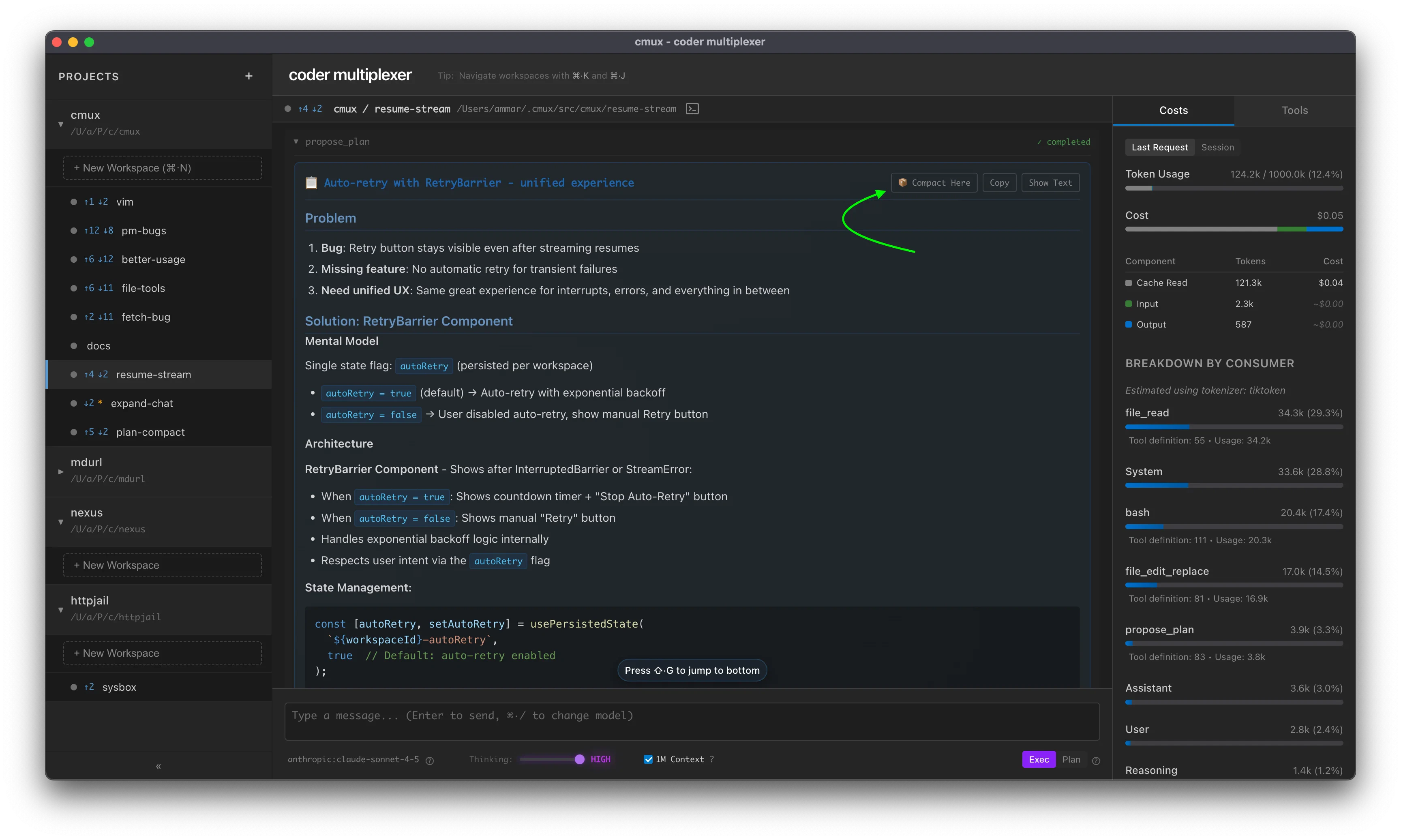 This is a form of "opportunistic compaction" — the content is already well-structured, so the operation is instant. You can review the new starting point before the old context is permanently removed, making this the only reversible compaction approach.
***
## Compact (AI Summarization)
Compress conversation history using AI summarization. Replaces the conversation with a compact summary that preserves context.
### Syntax
```
/compact [-t ] [-m ]
[continue message on subsequent lines]
```
### Options
* `-t ` — Maximum output tokens for the summary (default: \~2000 words)
* `-m ` — Model to use for compaction (sticky preference). Supports abbreviations like `haiku`, `sonnet`, or full model strings
### Examples
**Basic compaction:**
```
/compact
```
**Limit summary size:**
```
/compact -t 5000
```
**Choose compaction model:**
```
/compact -m haiku
```
Use Haiku for faster, lower-cost compaction. This becomes your default until changed.
**Auto-continue with custom message:**
```
/compact
Continue implementing the auth system
```
After compaction completes, automatically sends "Continue implementing the auth system" as a follow-up message.
**Multiline continue message:**
```
/compact
Now let's refactor the middleware to use the new auth context.
Make sure to add tests for the error cases.
```
Continue messages can span multiple lines for more detailed instructions.
**Combine all options:**
```
/compact -m haiku -t 8000
Keep working on the feature
```
Combine custom model, token limit, and auto-continue message.
### Notes
* Model preference persists globally across workspaces
* Uses the specified model (or workspace model by default) to summarize conversation history
* Preserves actionable context and specific details
* **Irreversible** — original messages are replaced
* Continue message is sent once after compaction completes (not persisted)
***
## Clear All History
Remove all messages from conversation history.
### Syntax
```
/clear
```
### Notes
* Instant deletion of all messages
* **Irreversible** — all history is permanently removed
* Use when you want to start a completely new conversation
This is a form of "opportunistic compaction" — the content is already well-structured, so the operation is instant. You can review the new starting point before the old context is permanently removed, making this the only reversible compaction approach.
***
## Compact (AI Summarization)
Compress conversation history using AI summarization. Replaces the conversation with a compact summary that preserves context.
### Syntax
```
/compact [-t ] [-m ]
[continue message on subsequent lines]
```
### Options
* `-t ` — Maximum output tokens for the summary (default: \~2000 words)
* `-m ` — Model to use for compaction (sticky preference). Supports abbreviations like `haiku`, `sonnet`, or full model strings
### Examples
**Basic compaction:**
```
/compact
```
**Limit summary size:**
```
/compact -t 5000
```
**Choose compaction model:**
```
/compact -m haiku
```
Use Haiku for faster, lower-cost compaction. This becomes your default until changed.
**Auto-continue with custom message:**
```
/compact
Continue implementing the auth system
```
After compaction completes, automatically sends "Continue implementing the auth system" as a follow-up message.
**Multiline continue message:**
```
/compact
Now let's refactor the middleware to use the new auth context.
Make sure to add tests for the error cases.
```
Continue messages can span multiple lines for more detailed instructions.
**Combine all options:**
```
/compact -m haiku -t 8000
Keep working on the feature
```
Combine custom model, token limit, and auto-continue message.
### Notes
* Model preference persists globally across workspaces
* Uses the specified model (or workspace model by default) to summarize conversation history
* Preserves actionable context and specific details
* **Irreversible** — original messages are replaced
* Continue message is sent once after compaction completes (not persisted)
***
## Clear All History
Remove all messages from conversation history.
### Syntax
```
/clear
```
### Notes
* Instant deletion of all messages
* **Irreversible** — all history is permanently removed
* Use when you want to start a completely new conversation